
A dictionary for any language,
built by AI, just for you.
Artivation Dictionary (formerly AI Dictionary) is a dictionary app that lets you build your own AI dictionaries for the language combinations you want to learn. Choose from 66 languages and add as many as you need: bilingual dictionaries like Japanese–English or English–German, monolingual ones like English–English, and glossaries for Japanese, science and social studies. Available on the web and iOS; Android is available on Google Play.
With the Chrome extension on desktop, select a word or phrase in an article and press Alt + S (Option + S on Mac) to look it up. Press the shortcut again to hear the pronunciation.
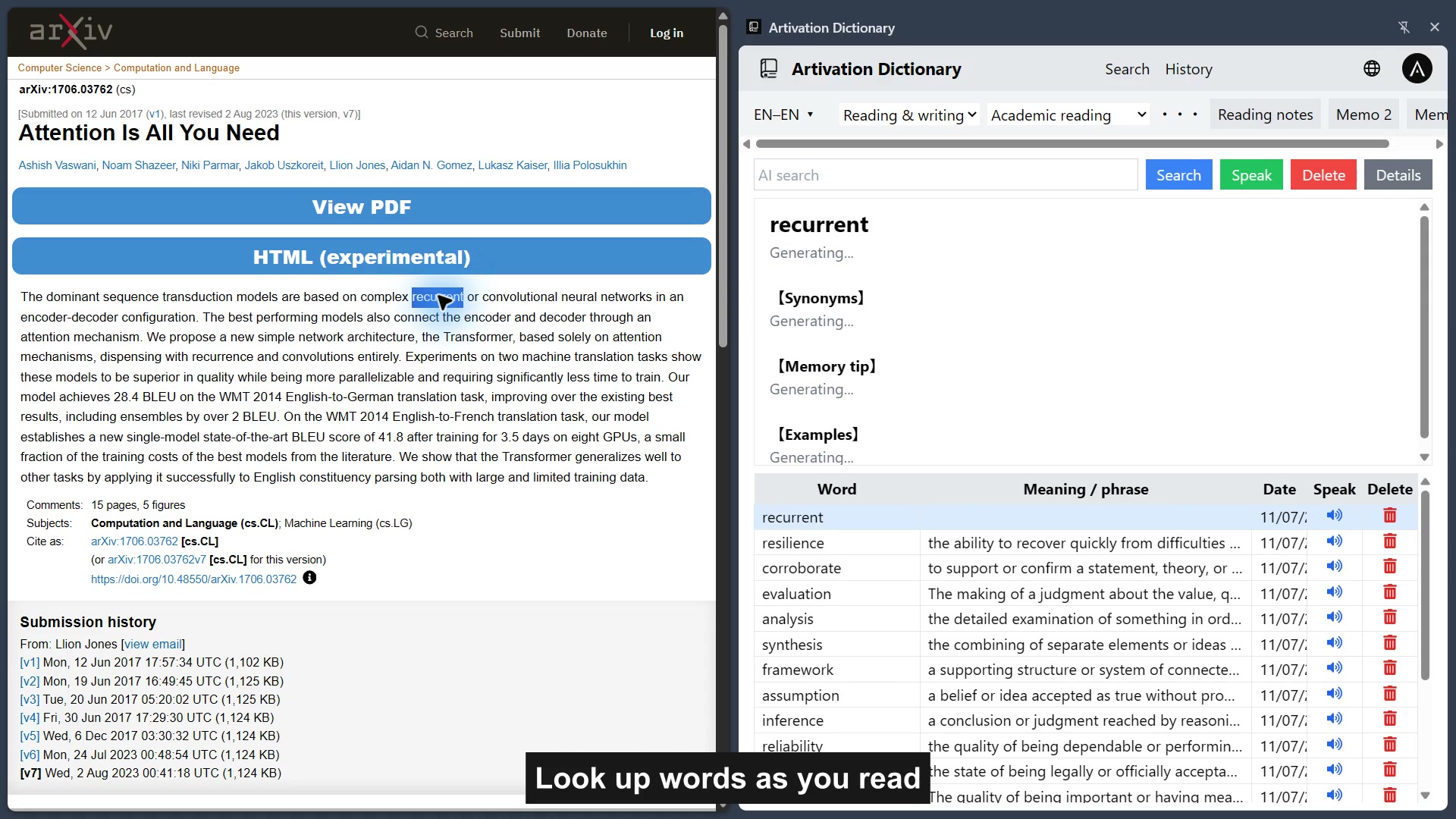
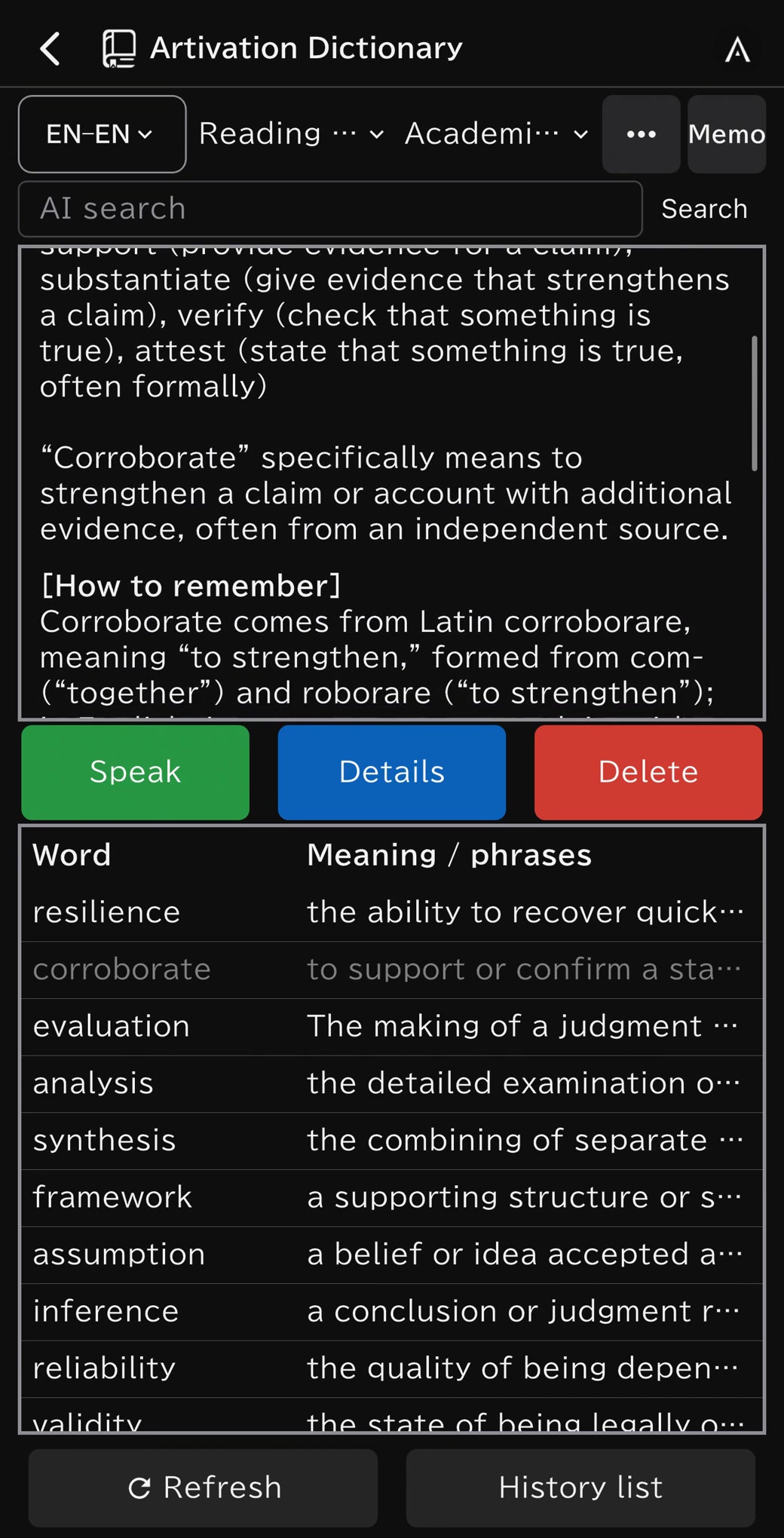
Read. Look it up. Keep learning on iPhone.
From the Chrome extension to iPhone: create a dictionary, organize folders and files, add notes, explore meanings and word origins, and review with tests.
Silent screen recordings. Use full screen for larger text.
Watch the portrait iPhone video
Don’t pick a dictionary.
Build one.
Paper dictionaries and dictionary apps alike made you choose from the language pairs they offered. With Artivation Dictionary, just pick your native language and the language you’re learning, and an AI dictionary for that pair is ready instantly. German after English, Vietnamese for work, science terms for your kids — add a dictionary each time you start learning something new. It was the first AI product Artivation planned, built and released after our founding, and we keep improving it.
Three kinds of dictionaries.
Look up the language you’re learning in your native language
Choose an explanation language and a target language, such as Japanese–English, Japanese–German or English–German. It detects the search direction from what you type, so you can look up words from either side.
Look up and explain in a single language
Like English–English, German–German or Japanese–Japanese: look up and get explanations in the same language. Ideal for advanced learners and for grasping nuance.
Look up terms from school subjects
Clear explanations of terms from Japanese language arts, science and social studies, in the language you choose. Useful for Japanese vocabulary and for preparing and reviewing lessons.
Choose from 66 languages, including Japanese, English, German, French, Spanish, Chinese, Korean, Vietnamese, Thai, Arabic and Hindi. You can reorder your favorite dictionaries to switch between them instantly.
Your own dictionary in three steps.
It reads the word before it explains it.
Artivation Dictionary now interprets what you type first. Words with several meanings show up to 20 candidates with their part of speech, and you can switch with “Other candidates ▾”.
Words with several meanings
The most likely meaning comes first. Meanings that change usage or examples are listed separately, so you can pick the one that fits.
Spelling and grammar slips
Small mistakes are corrected and explained in the right form. What you typed is kept.
Idioms and sentences
Idioms are explained from how the expression came about, sentences from how they are built — word order, tense and more. Input it cannot identify gets a notice instead of an invented explanation.
Use cases
For a second language at university
Build dictionaries for German, French, Chinese and more alongside your English one. Look up words from handouts and textbooks to get memory tips and examples, and review the words saved for each class before a test.
Reading, writing, speaking, listening
Check a word’s nuance in prose, find close expressions from your native language, or guess spellings from what you heard.
For work or study abroad
Dealing with overseas partners or local staff, or preparing to study or move abroad — create a dictionary for whatever language you need, on the spot.
For schoolwork
Use the glossaries for Japanese language arts, science and social studies to understand the meaning and background of words in textbooks. Words you look up are saved by textbook and class, ready for a vocabulary test.
Features
66 languages
Freely choose language combinations and add as many dictionaries as you need. Delete the ones you no longer use.
History and tests
Save words in a two-level structure of folders and files. Test yourself with ranges narrowed by date, checkmarks or search direction.
Any device, with your Artivation ID
Log in with your Artivation ID and your dictionaries and history sync. Look words up on your computer and review on your phone. You can also open it from Artivation App.
Compared with other options
| Artivation Dictionary | Translation services | Generative AI chat | Vocabulary apps | |
|---|---|---|---|---|
| Languages | ◎ Build dictionaries in 66 languages | ◎ Multilingual | ◎ Multilingual | △ Limited languages |
| Lookup speed | ◎ Quick lookups | ◎ Instant | △ Requires conversational input | × Not built for lookups |
| Clarity | ◎ Explained in prose | △ Word-focused | ◎ Detailed explanations | △ Limited to registered words |
| History | ◎ Folder management | △ Limited | × Not a learning manager | ◎ Yes |
| Tests | ◎ Designed for learning | × None | × None | ◎ Yes |
| Pricing | Free / ¥500/month | Free / paid plans available | Free / paid plans available | Free / paid plans available |
This summarizes general tendencies and is not an evaluation of any specific product.
Pricing
Use it with up to 100 searches.
Unlimited searches.
Get started
- Web
- Use it in your browser.Open the web app ↗
- Artivation App
- Log in with your Artivation ID to open it from the app list.Open Artivation App ↗
- iOS
- Available in Artivation App on the App Store.View on the App Store ↗
- Android
- Artivation App for Android is available on Google Play.Get the Android app ↗
FAQ
Which languages are supported?
66 languages, including Japanese, English, German, French, Spanish, Chinese and Korean. For bilingual dictionaries, you can freely combine your native language and target language from this list. Chinese is split into Simplified and Traditional. The app itself can be shown in 6 languages: Japanese, English, Simplified and Traditional Chinese, German and Korean.
How many dictionaries can I create?
You can add as many dictionaries as you need. You can delete dictionaries you no longer use from “Manage my dictionaries.”
Which AI does it use?
It uses OpenAI’s chat-gpt-4o-mini.
Can schools or cram schools use it?
Yes. We can create student accounts in bulk and offer group contracts, and the same word lists work in class, in study rooms and at home. If you are considering it for an educational institution, please reach us through our contact form.
Build your own dictionary.
Available on the web, iOS, or through Artivation App. Android is available on Google Play.